Complete Integration Enables you to Provide Better and Faster Service to your Customers.
Customer Relationship In ERP, SaaS, eCommerce & POS Software
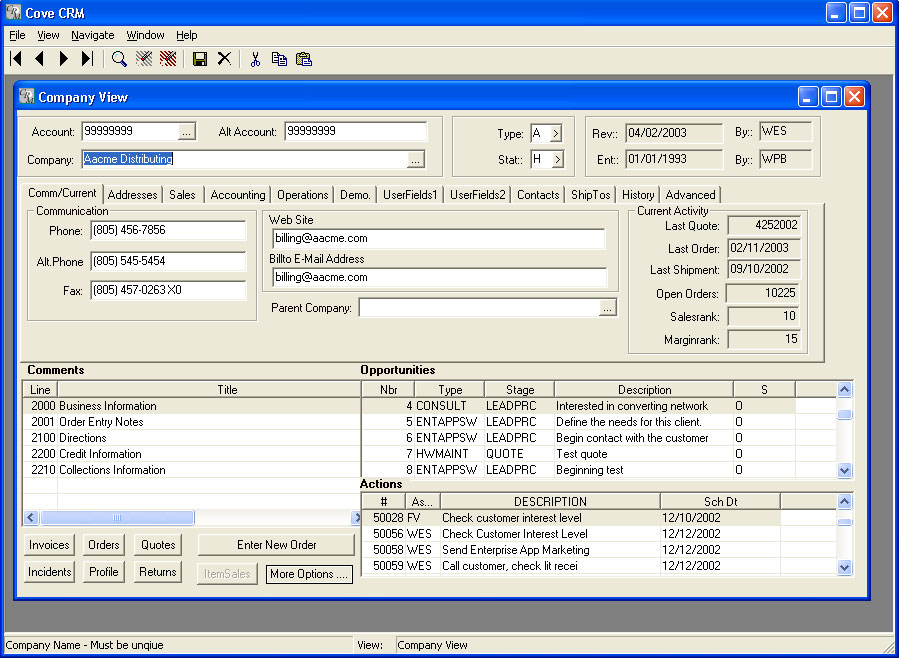
The Customer Relationship Module is a powerful application which can be used to perform a variety of customer services and marketing tasks. The CRM module is completely integrated with the other modules in the Stream V system, and it allows you to access a large number of programs with a minimum amount of navigation.
You may use the CRM module to locate and view existing customer and contact information, and to create new customer and contact records. You may also use the module to access current sales order and invoice status and history. The CRM module allows you to create new quotes and sales orders, to edit existing quotes and sales orders, and to create and process opportunity, incident and action records for your customers and contacts.
In addition, you can use the module to define, create and process scripts for profiling your customers, to look up inventory availability and pricing, and to view and set up special pricing records for particular customer/item combinations.
Fully Customizable
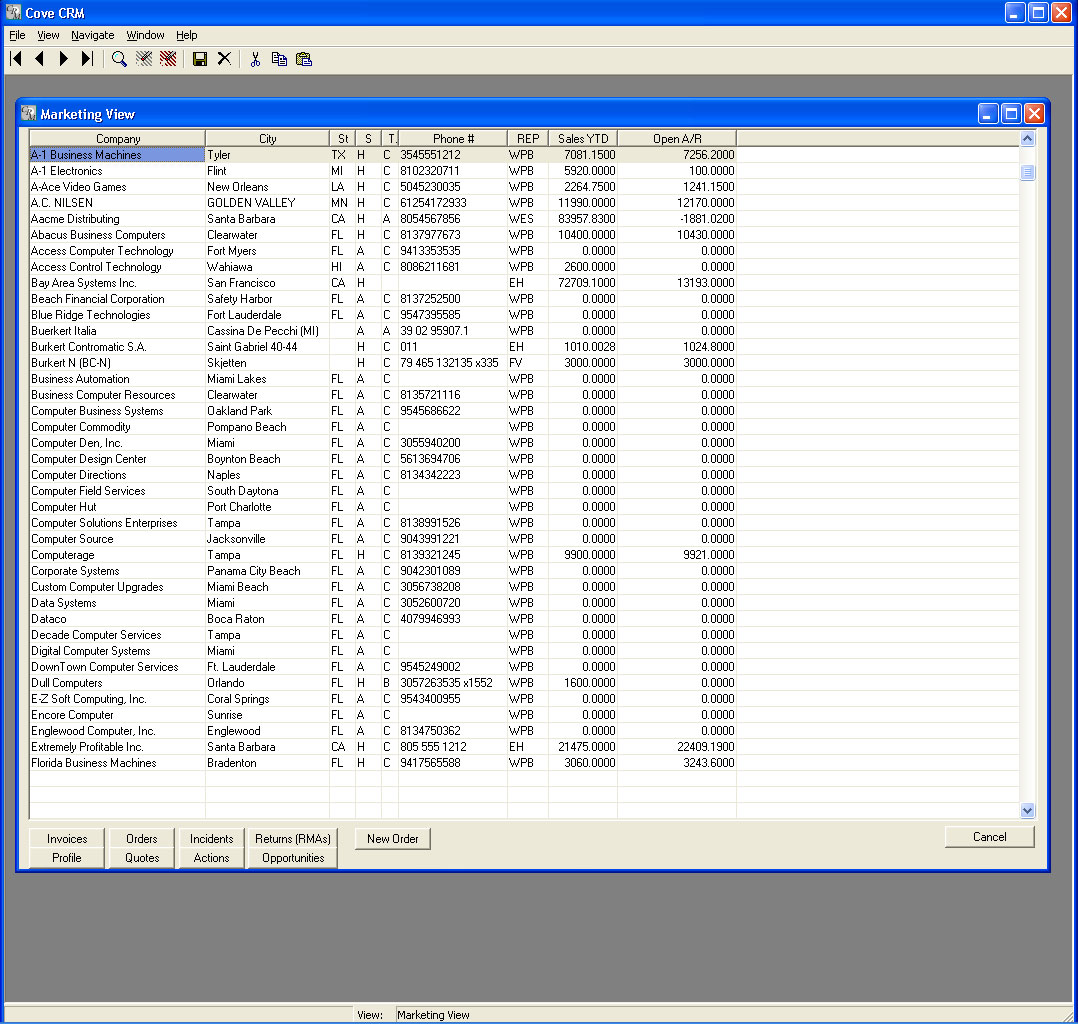
The CRM Module makes use of customizable multi-parameter browses and standard selection lists. These powerful, interfaces allow you to display and search the records in your database in several different ways.
The CRM Module also contains many panel based programs that are used for creating and maintaining "master" data records. These master programs contain a large variety of fields for tracking and organizing information about the individuals and companies that you do business with, and they give you complete control of the data that is critical to your business success. Validation tables and custom fields can be created or assigned as the need arises, and modified as required to meet your business needs.
Standard customer and contact information can be defaulted into new records and security can be controlled at the field level on a group or user basis. Text information or "comments" can easily be attached to all types of database information and automatically retrieved with a minimum of keystrokes.
Flexible
The CRM system is flexible and it offers a wealth of features that can be implemented when you need them with a minimum of configuration and programming. It offers powerful security options, state of the art technology, and mature procedures that have been developed through many years of real world experience. The system also offers simplicity which is important for companies who are growing and want to prepare for the future without being overwhelmed by features and configuration requirements they don't need in the present.
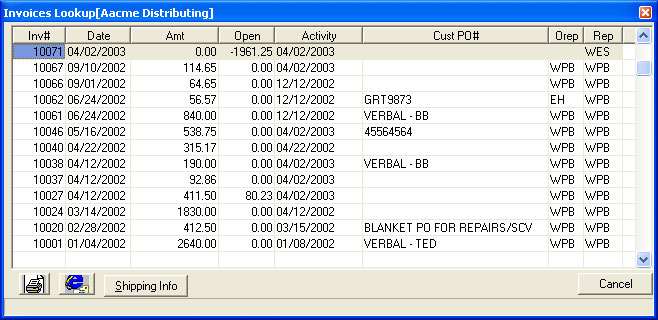
As you select customers and contacts in the CRM system, all related information for the entities are available to you - open and closed sales orders, quotes, invoices, marketing information, questionnaire information, notes, statistics and pricing information. Entering an order or checking inventory status can be done with a quick click in one integrated application.
In short, CRM allows you to do business in the 21st century, quickly, efficiently, collaboratively, and profitably. You can look good to your customers, your customers can get what they need, and these customers will keep coming back to you due to the service level you can provide with this application.
Real Time CRM
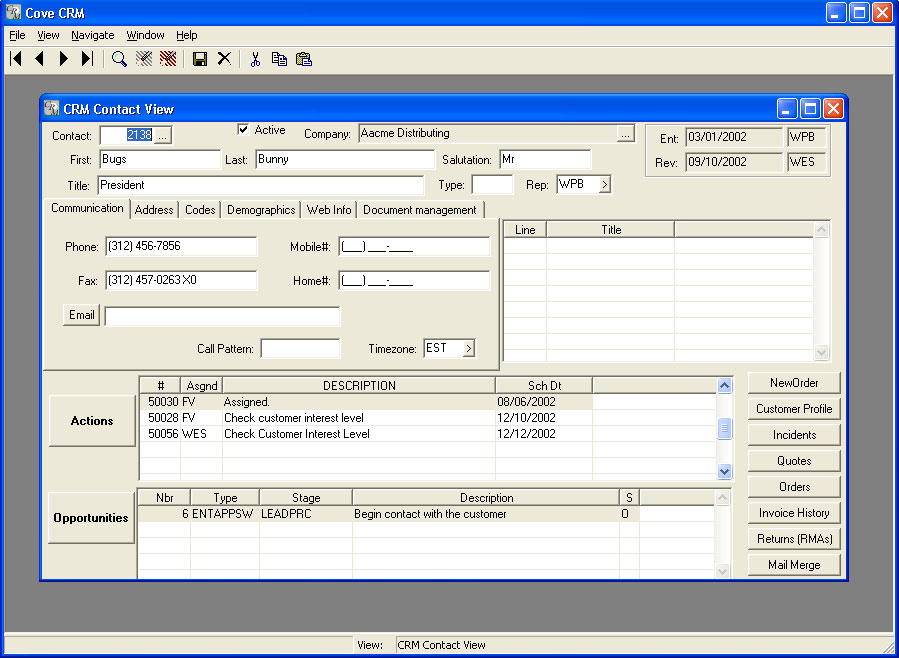
The Customer Relationship Module is designed to be your primary customer service, service support, and sales support tool. It therefore allows you to create, maintain, and/or access a large amount of information from one centralized location. The information in the CRM module is stored in various files in the Stream V Database structure and it is used by or can come from several different but integrated systems. The key is that all customer information is available on a real time basis. There are no uploads or downloads.
The CRM Module is used to create and maintain the Customer and Contact records for the entities or resources you do business with. It is also used to gather and organize various types of marketing and other information about your contacts and customers as you continue to do business with them. In addition, the CRM system allows you to view current status and historical information about entities and their transactions.
The purpose of this application is to enable you to view all relevant information about your customers and contacts from one place, and to allow you to process transactions for them with a minimum of time and effort.
Customer Scripting and Profiling
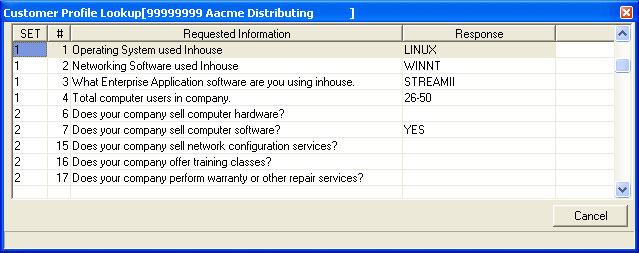
The STREAM V scripting and profiling system (SPS) allows you to create information gathering scripts and maintain an unlimited amount of structured information about your customers. This information can be used to produce reports, address labels or action records to generate outbound sales calls. Examples of the data that can be stored in the profiling system are:
- Additional customer information not in the customer master record
- Products the customer sells
- Manufacturer Authorizations
- Trade Association Memberships
- Market Focuses
- Sales Contest or Promotion Information
SPS is based on a question and answer design that allows multiple sets of questions to be maintained and the answers associated with customer records. SPS is based on two files, the QUESTION (F34) file which contains the question and information describing how the data should be collected and the ANSWER (F35) file which contains the answers. The questions in the question file are organized into question sets. Specific question sets can be assigned to customers individually or by customer type.
Questions are attached to the customer record through the use of the answer records, which are automatically created for each question record. The system can be configured to automatically prompt the users to answer questions that have not been answered ,or questions where the answer has expired (date sensitive questions).
Order Entry
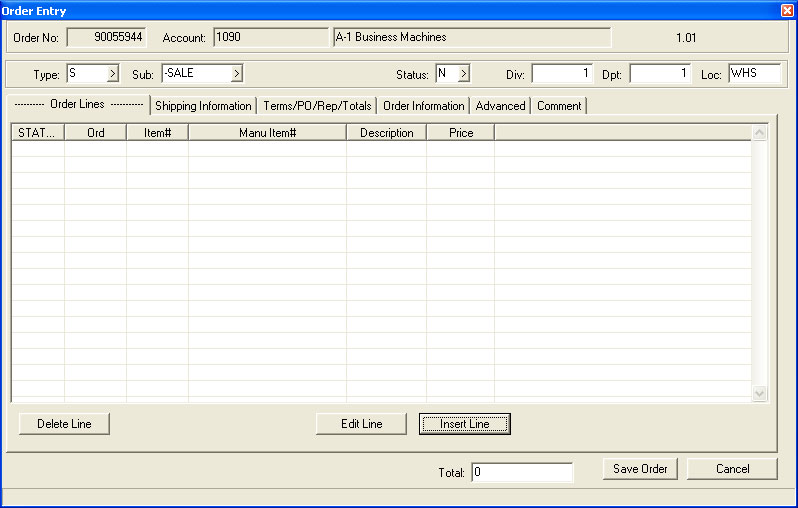
Order entry is available directly from the CRM module. In any customer screen you simply press a single button to be sent to the order entry program. At that time you can enter an order, a quote, or a loaner/sample order for the client. There is no need to bounce from one module to another, one application to another, or even download/upload information.
When you are in Stream V CRM you are in the live data base. Enter an order and it shows up immediately on the open order screen. If the order is part of an opportunity, you simply select the opportunity number during order entry and it is tied to the Opportunity.
Incidents/Actions System
The Incidents Button allows you to view the Incidents that have been created for the selected customer. When a valid company is loaded into the Company View and the Incidents button is pressed, the system displays the Incident Lookup program. The Incident Lookup program displays the incident records that have been entered for the company. Open or closed incidents can be selected using the radio button that and it allows you to view detailed information about each incident.
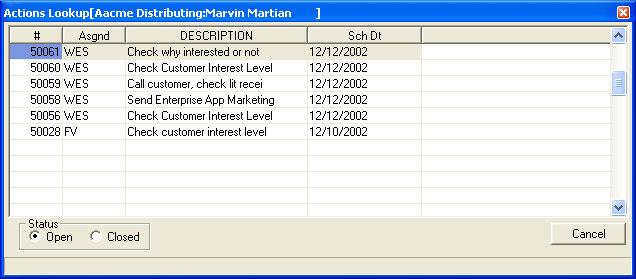
When a valid contact record is selected and the Actions button is pressed, the System displays the Actions Lookup. The Actions Lookup displays the Actions records that have been created for the selected contact. Actions records represent tasks that need to be performed and action records are used in order to allow the application to provide to do lists to sales reps and other personnel in your company. Actions can be associated with different types of records including Opportunities, incidents, contacts and customers. Action records are discussed in detail in the Overview section of this document.
The Actions Lookup program allows you to view or edit existing Actions records, and to create new Action records. You may view and or edit an opportunity by highlighting the record and using the ZOOM option. You may create a new opportunity for the selected customer using the INSERT option. In both cases, the system will display the Action Dialog program.
Recent Features and Enhancements to this Module
- CRM: Added display of tax rate on Company Detail Panel
- CRM: Disallowed changing company name to blank is companyname change view
- CRM: Added code to Contact Manager to auto create -CONTACT company record if missing.
- CRM ERP SaaS: Renamed ActionsLookup View to Actions Management
- CRM ERP SaaS: Added option provided for companies where sales people control the picking process and is normally not usedin an operation with dedicated warehouse personnel.
- CRM: Added Sch_Time (Scheduled Time) to order header and order lines
- CRM: Consolidated shipping information into one standard group that is the same on Company Manager and Company Detail Panel.
- CRM: Added code to present list of company contacts when sending email from Order Entry.
Customer Relationship Management Features

Customer Relationship In ERP, SaaS, eCommerce & POS Software
The Customer Relationship Module is a powerful application which can be used to perform a variety of customer services and marketing tasks. The CRM module is completely integrated with the other modules in the Stream V system, and it allows you to access a large number of programs with a minimum amount of navigation.
You may use the CRM module to locate and view existing customer and contact information, and to create new customer and contact records. You may also use the module to access current sales order and invoice status and history. The CRM module allows you to create new quotes and sales orders, to edit existing quotes and sales orders, and to create and process opportunity, incident and action records for your customers and contacts.
In addition, you can use the module to define, create and process scripts for profiling your customers, to look up inventory availability and pricing, and to view and set up special pricing records for particular customer/item combinations.
Fully Customizable
The CRM Module makes use of customizable multi-parameter browses and standard selection lists. These powerful, interfaces allow you to display and search the records in your database in several different ways.
The CRM Module also contains many panel based programs that are used for creating and maintaining “master” data records. These master programs contain a large variety of fields for tracking and organizing information about the individuals and companies that you do business with, and they give you complete control of the data that is critical to your business success. Validation tables and custom fields can be created or assigned as the need arises, and modified as required to meet your business needs.
Standard customer and contact information can be defaulted into new records and security can be controlled at the field level on a group or user basis. Text information or “comments” can easily be attached to all types of database information and automatically retrieved with a minimum of keystrokes.
Flexible
The CRM system is flexible and it offers a wealth of features that can be implemented when you need them with a minimum of configuration and programming. It offers powerful security options, state of the art technology, and mature procedures that have been developed through many years of real world experience. The system also offers simplicity which is important for companies who are growing and want to prepare for the future without being overwhelmed by features and configuration requirements they don’t need in the present.
As you select customers and contacts in the CRM system, all related information for the entities are available to you – open and closed sales orders, quotes, invoices, marketing information, questionnaire information, notes, statistics and pricing information. Entering an order or checking inventory status can be done with a quick click in one integrated application.
In short, CRM allows you to do business in the 21st century, quickly, efficiently, collaboratively, and profitably. You can look good to your customers, your customers can get what they need, and these customers will keep coming back to you due to the service level you can provide with this application.
Real Time CRM
The Customer Relationship Module is designed to be your primary customer service, service support, and sales support tool. It therefore allows you to create, maintain, and/or access a large amount of information from one centralized location. The information in the CRM module is stored in various files in the Stream V Database structure and it is used by or can come from several different but integrated systems. The key is that all customer information is available on a real time basis. There are no uploads or downloads.
The CRM Module is used to create and maintain the Customer and Contact records for the entities or resources you do business with. It is also used to gather and organize various types of marketing and other information about your contacts and customers as you continue to do business with them. In addition, the CRM system allows you to view current status and historical information about entities and their transactions.
The purpose of this application is to enable you to view all relevant information about your customers and contacts from one place, and to allow you to process transactions for them with a minimum of time and effort.
Customer Scripting and Profiling
The STREAM V scripting and profiling system (SPS) allows you to create information gathering scripts and maintain an unlimited amount of structured information about your customers. This information can be used to produce reports, address labels or action records to generate outbound sales calls. Examples of the data that can be stored in the profiling system are:
- Additional customer information not in the customer master record
- Products the customer sells
- Manufacturer Authorizations
- Trade Association Memberships
- Market Focuses
- Sales Contest or Promotion Information
SPS is based on a question and answer design that allows multiple sets of questions to be maintained and the answers associated with customer records. SPS is based on two files, the QUESTION (F34) file which contains the question and information describing how the data should be collected and the ANSWER (F35) file which contains the answers. The questions in the question file are organized into question sets. Specific question sets can be assigned to customers individually or by customer type.
Questions are attached to the customer record through the use of the answer records, which are automatically created for each question record. The system can be configured to automatically prompt the users to answer questions that have not been answered ,or questions where the answer has expired (date sensitive questions).
Order Entry
Order entry is available directly from the CRM module. In any customer screen you simply press a single button to be sent to the order entry program. At that time you can enter an order, a quote, or a loaner/sample order for the client. There is no need to bounce from one module to another, one application to another, or even download/upload information.
When you are in Stream V CRM you are in the live data base. Enter an order and it shows up immediately on the open order screen. If the order is part of an opportunity, you simply select the opportunity number during order entry and it is tied to the Opportunity.
Incidents/Actions System
The Incidents Button allows you to view the Incidents that have been created for the selected customer. When a valid company is loaded into the Company View and the Incidents button is pressed, the system displays the Incident Lookup program. The Incident Lookup program displays the incident records that have been entered for the company. Open or closed incidents can be selected using the radio button that and it allows you to view detailed information about each incident.
When a valid contact record is selected and the Actions button is pressed, the System displays the Actions Lookup. The Actions Lookup displays the Actions records that have been created for the selected contact. Actions records represent tasks that need to be performed and action records are used in order to allow the application to provide to do lists to sales reps and other personnel in your company. Actions can be associated with different types of records including Opportunities, incidents, contacts and customers. Action records are discussed in detail in the Overview section of this document.
The Actions Lookup program allows you to view or edit existing Actions records, and to create new Action records. You may view and or edit an opportunity by highlighting the record and using the ZOOM option. You may create a new opportunity for the selected customer using the INSERT option. In both cases, the system will display the Action Dialog program.
Recent Features and Enhancements to this Module
- CRM: Added display of tax rate on Company Detail Panel
- CRM: Disallowed changing company name to blank is companyname change view
- CRM: Added code to Contact Manager to auto create -CONTACT company record if missing.
- CRM ERP SaaS: Renamed ActionsLookup View to Actions Management
- CRM ERP SaaS: Added option provided for companies where sales people control the picking process and is normally not usedin an operation with dedicated warehouse personnel.
- CRM: Added Sch_Time (Scheduled Time) to order header and order lines
- CRM: Consolidated shipping information into one standard group that is the same on Company Manager and Company Detail Panel.
- CRM: Added code to present list of company contacts when sending email from Order Entry.