The Most Valuable Module in Stream V to Assembly Operations.
Essential for Assembly, Distribution and Manufacturing Businesses
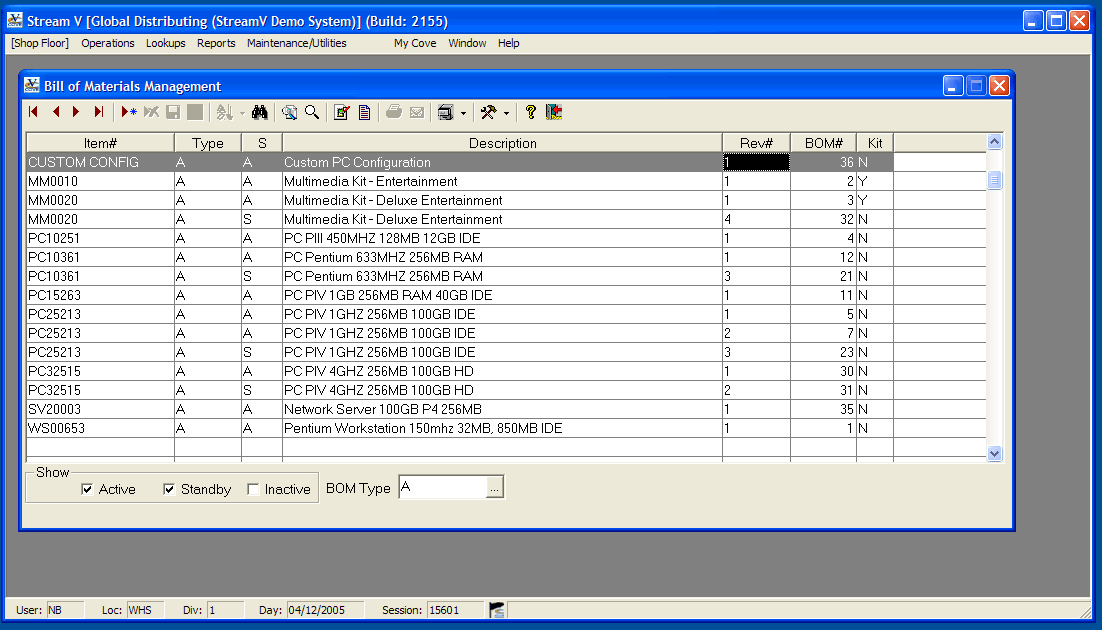
The Bill of Materials is essential in assembly, distribution and manufacturing businesses. Businesses need to have a "parts list" in order to put together certain items like computers, for example. With Stream V the Bill of Materials Module has everything you need to efficiently run your assembly & discrete manufacturing processes.
A Bill of Materials inventory list is used by the Shop Floor and the Kitting systems and they define how the items that you build or kit in-house are put together (they list components and quantities required to create a top level item). You can store multiple bills of materials for each item that can be built. Unique identification numbers are automatically assigned.The BOM is integrated into the inventory software so that efficiency turns into profitability.
Bill of Materials Reports
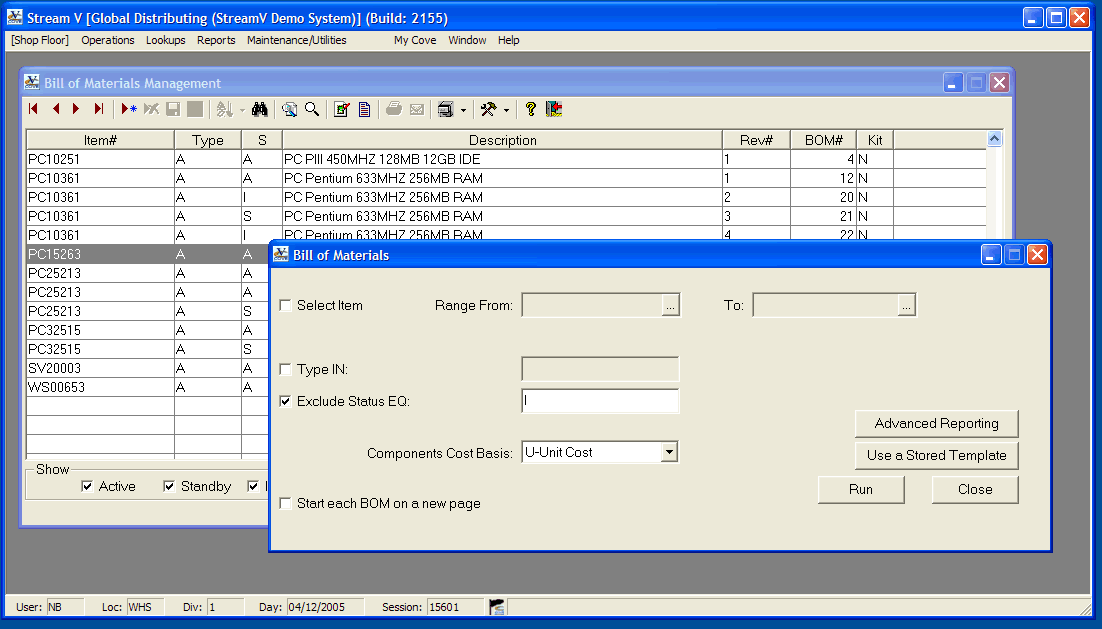
A Bill of Materials report lists the bills of material in which each component part is used. The bill of materials report is used to output detailed information about each Bills of Materials that have been defined on your system. This is especially useful for manufacturing, assembly and distribution operations.
Selection Options:
There are multiple selection options, these include the following.
- Item Range - Allows you to select only the Bills of Materials that have been set up for the selected items (range of top level items).
- Type - Allows you to select only the Bill of Materials which have the selected BOM Type or Types.
- Exclude status - Allows you to exclude Bills of Material which have the selected status.
Output Format:
The report output and selection information can also be customized using the Advanced Reporting Options and the Design report options that are available in the system.
Multiple Comments for Bill of Materials
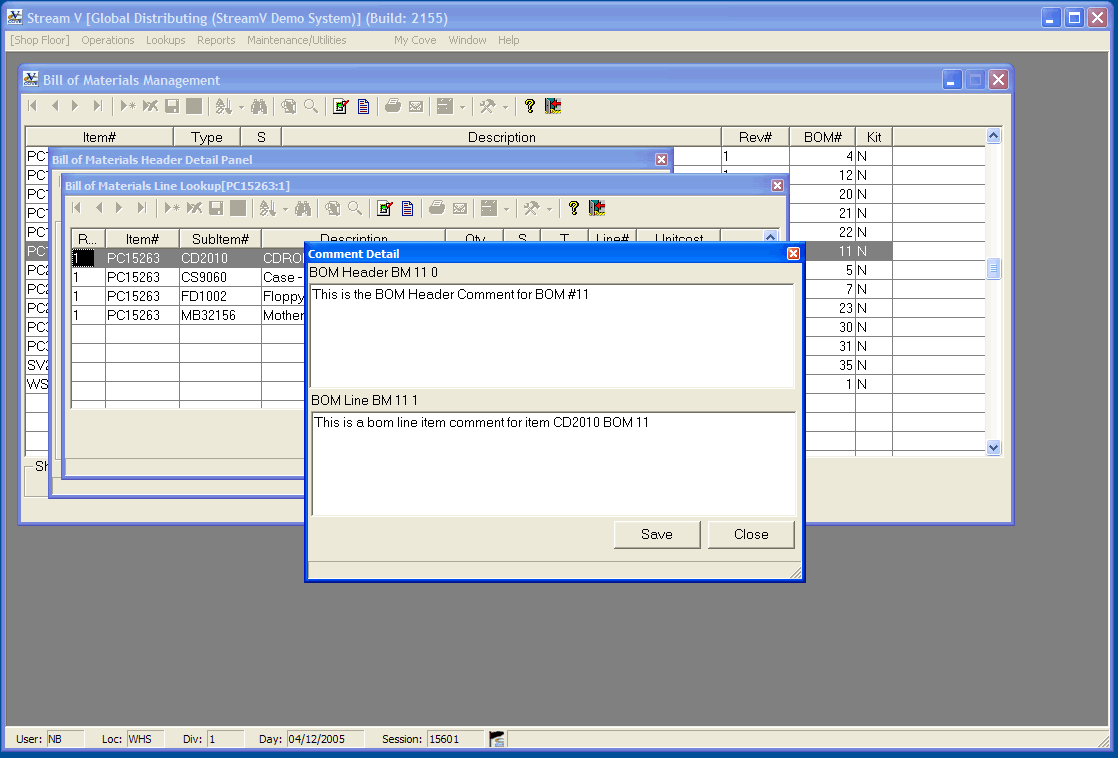
You can describe how the items in a specific Bill of Materials should be used or handled during assembly. The Bill of Materials Comments is accessible from the Shop Floor programs and is automatically printed on the documents produced by the Shop Floor system. You can leave multiple comments. View and edit both the comment for the selected bill of materials header and the comment for the selected bill of materials line item.
Integration and easy access to your information is the key to managing your assembly, manufacturing or distribution business successfully; with Stream V you can view comments stored in the inventory in the BOM program.
Line Lookup tailored to Assembly, Distribution and Manufacturing
The Bill of Materials Line Lookup program is used to display and edit the component items and quantities that are included in a specific bill of materials. The Bill of Materials Line Lookup program allows assembly, Distribution and Manufacturing companies to.
- Create a new BOM or BOM Revision
- Display or edit an existing BOM
- View, edit or create Inventory Manufacturing comments
- View, edit or create a Bill of Materials Line Comment
- Customize Displayed Fields
The fields which are displayed for each component in the program can be customized, but the program normally displays the component item number and description, the quantity of the component required to build the top level item and the Stk flag from the Inventory record for each component (this allows you to id any non stock items that are included in the BOM).
- Copy and modify an existing BOM to use it for building a different item (change the top level item)
- Copy an existing BOM in order to create a new BOM for the same item
- View, Edit or Create an Inventory Manufacturing (Assembly) Comment for the top level and component items in the BOM
- View, Edit or Create Bill of Materials Header and Line Comments
- View Inventory Manufacturing (Assembly) Comment
Recent Features and Enhancements to this Module
- Bill Of Materials: Cleaned up Bom screens where toolbar was encroaching into fields on display
- Bill Of Materials: Added code to create box records for Kits by scanning the current BOM.
Shortcut Keys & Rapid Assembly Entry
Stream V Bill of Materials includes an extensive array of shortcut keys designed for high-speed assembly and kitting operations. Operators can quickly insert components, duplicate existing BOM templates, toggle stock and non-stock line indicators, and drill down into sub-assemblies without leaving the keyboard.
Kitting Enabled & Dynamic Sub-Assemblies
With Stream V, the Kitting system seamlessly communicates with both the Shop Floor and Sales Order Entry. As orders are received, kits can be auto-allocated, exploded into individual component pick requirements, or assembled on demand with automatic box and packaging records generated by scanning the BOM.
Integrated to Inventory Management
The Bill of Materials is tightly integrated with the Stream V Inventory Control system. When a build or kit transaction is completed, finished goods are instantly credited to on-hand inventory while required raw materials and sub-components are automatically relieved in real time. Serial number tracking, lot numbers, and multi-bin locations are fully synchronized.
Integrated to Shop Order Management
Stream V connects your Bill of Materials directly with the Shop Order Management module. Release production work orders directly from approved BOM revisions, schedule labor and work centers, calculate material requirements planning (MRP), and track real-time job costs from raw material to finished product.
Integrated to Shop Floor Operations
Deliver precise build instructions directly to shop floor personnel. Assembly comments, technical drawings, component handling precautions, and quality assurance checkpoints defined in the BOM are automatically printed on shop traveler documents and displayed on floor terminals.
Multiple Inventory Support
Support multi-warehouse and multi-facility assembly requirements. Define whether components should be pulled from central warehouses, local assembly plants, or consignment inventory. The system tracks item status (stocked, non-stocked, or drop-shipped) at each individual inventory facility.
Bill of Materials Features

Essential for Assembly, Distribution and Manufacturing Businesses
The Bill of Materials is essential in assembly, distribution and manufacturing businesses. Businesses need to have a “parts list” in order to put together certain items like computers, for example. With Stream V the Bill of Materials Module has everything you need to efficiently run your assembly & discrete manufacturing processes.
A Bill of Materials inventory list is used by the Shop Floor and the Kitting systems and they define how the items that you build or kit in-house are put together (they list components and quantities required to create a top level item). You can store multiple bills of materials for each item that can be built. Unique identification numbers are automatically assigned.The BOM is integrated into the inventory software so that efficiency turns into profitability.
Bill of Materials Reports
A Bill of Materials report lists the bills of material in which each component part is used. The bill of materials report is used to output detailed information about each Bills of Materials that have been defined on your system. This is especially useful for manufacturing, assembly and distribution operations.
Selection Options:
There are multiple selection options, these include the following.
- Item Range – Allows you to select only the Bills of Materials that have been set up for the selected items (range of top level items).
- Type – Allows you to select only the Bill of Materials which have the selected BOM Type or Types.
- Exclude status – Allows you to exclude Bills of Material which have the selected status.
Output Format:
The report output and selection information can also be customized using the Advanced Reporting Options and the Design report options that are available in the system.
Multiple Comments for Bill of Materials
You can describe how the items in a specific Bill of Materials should be used or handled during assembly. The Bill of Materials Comments is accessible from the Shop Floor programs and is automatically printed on the documents produced by the Shop Floor system. You can leave multiple comments. View and edit both the comment for the selected bill of materials header and the comment for the selected bill of materials line item.
Integration and easy access to your information is the key to managing your assembly, manufacturing or distribution business successfully; with Stream V you can view comments stored in the inventory in the BOM program.
Line Lookup tailored to Assembly, Distribution and Manufacturing
The Bill of Materials Line Lookup program is used to display and edit the component items and quantities that are included in a specific bill of materials. The Bill of Materials Line Lookup program allows assembly, Distribution and Manufacturing companies to.
- Create a new BOM or BOM Revision
- Display or edit an existing BOM
- View, edit or create Inventory Manufacturing comments
- View, edit or create a Bill of Materials Line Comment
- Customize Displayed Fields
The fields which are displayed for each component in the program can be customized, but the program normally displays the component item number and description, the quantity of the component required to build the top level item and the Stk flag from the Inventory record for each component (this allows you to id any non stock items that are included in the BOM).
- Copy and modify an existing BOM to use it for building a different item (change the top level item)
- Copy an existing BOM in order to create a new BOM for the same item
- View, Edit or Create an Inventory Manufacturing (Assembly) Comment for the top level and component items in the BOM
- View, Edit or Create Bill of Materials Header and Line Comments
- View Inventory Manufacturing (Assembly) Comment
Recent Features and Enhancements to this Module
- Bill Of Materials: Cleaned up Bom screens where toolbar was encroaching into fields on display
- Bill Of Materials: Added code to create box records for Kits by scanning the current BOM.
Shortcut Keys & Rapid Assembly Entry
Stream V Bill of Materials includes an extensive array of shortcut keys designed for high-speed assembly and kitting operations. Operators can quickly insert components, duplicate existing BOM templates, toggle stock and non-stock line indicators, and drill down into sub-assemblies without leaving the keyboard.
Kitting Enabled & Dynamic Sub-Assemblies
With Stream V, the Kitting system seamlessly communicates with both the Shop Floor and Sales Order Entry. As orders are received, kits can be auto-allocated, exploded into individual component pick requirements, or assembled on demand with automatic box and packaging records generated by scanning the BOM.
Integrated to Inventory Management
The Bill of Materials is tightly integrated with the Stream V Inventory Control system. When a build or kit transaction is completed, finished goods are instantly credited to on-hand inventory while required raw materials and sub-components are automatically relieved in real time. Serial number tracking, lot numbers, and multi-bin locations are fully synchronized.
Integrated to Shop Order Management
Stream V connects your Bill of Materials directly with the Shop Order Management module. Release production work orders directly from approved BOM revisions, schedule labor and work centers, calculate material requirements planning (MRP), and track real-time job costs from raw material to finished product.
Integrated to Shop Floor Operations
Deliver precise build instructions directly to shop floor personnel. Assembly comments, technical drawings, component handling precautions, and quality assurance checkpoints defined in the BOM are automatically printed on shop traveler documents and displayed on floor terminals.
Multiple Inventory Support
Support multi-warehouse and multi-facility assembly requirements. Define whether components should be pulled from central warehouses, local assembly plants, or consignment inventory. The system tracks item status (stocked, non-stocked, or drop-shipped) at each individual inventory facility.