To schedule a demo use the form below to be connected with an executive at Cove Systems to discuss your system requirements and setup a presentation. This is not a direct link to a salesperson.
Integrated, Real-time Interface with General Ledger - GL
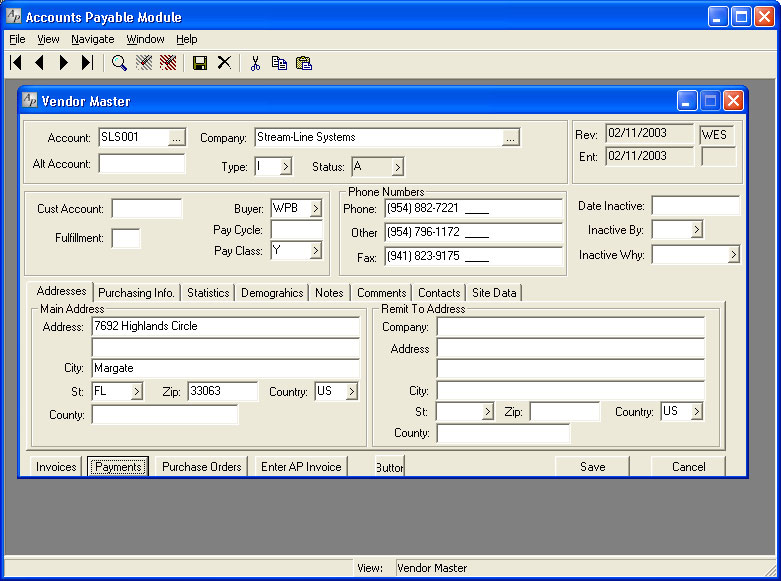
The Integrated Accounts Payable module is one of the two pillars on which the General Ledger stands. This module feeds the General Ledger with subsidiary information needed to complete the liability and expense sections of the balance sheet and income statement, providing a complete financial of the company.
On-line Accounts Payable Management
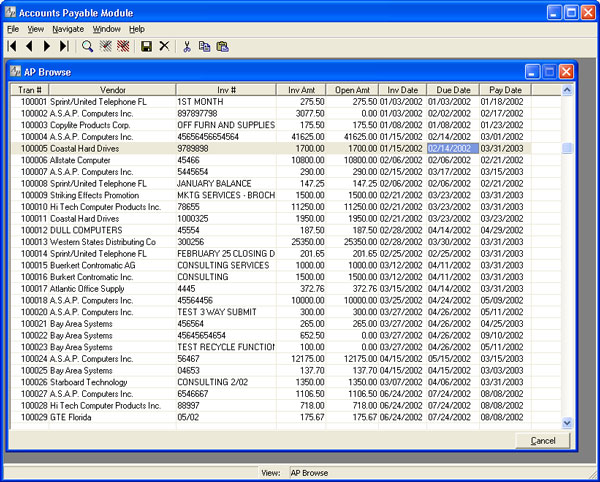
The Accounts Payable, AP module will allow more efficient cash management, better control of your expenses, more accurate information, and reduce the manpower required to process your accounts payable activity. Ease of entering Accounts Payable invoices is the hallmark of this module. Single or multiple partial payments and accruals are easily set up, including future payment and amortization dates.
Payment Selection Made Easy
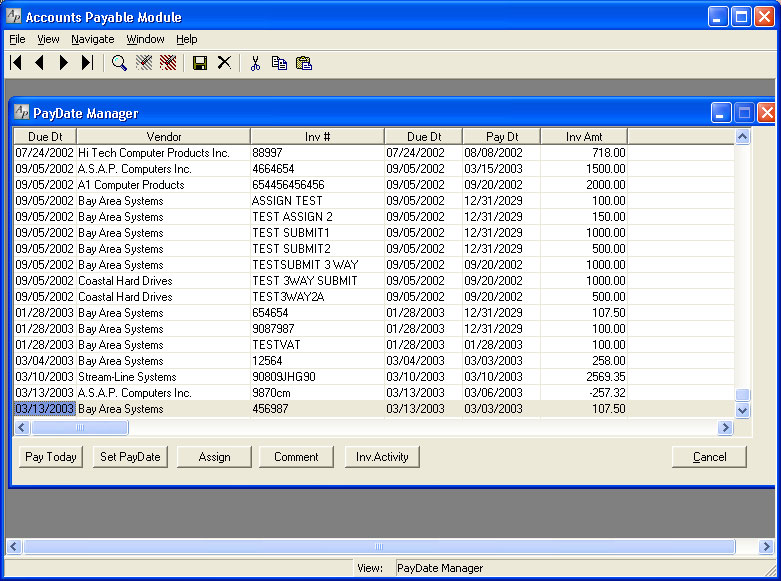
Using the simplest and most efficient mechanism in the industry for choosing which invoices to select for payment, the Accounts Payable module increases the productivity of any accounts payable department. Based on easy-to-set parameters, payment dates may be automatically assigned, manually entered, or combinations of both, during Accounts Payable invoice entry. Payment and due dates may be automatically calculated based on the invoice date, payment terms, and vendor, as well as company policy.
Open Accounts Payable invoices in the Stream V Business Accounting Software may be paid manually or automatically after printing an optional check proof report. Invoices may be automatically selected for payment by vendor type, due date, scheduled payment date, manually by invoice number or by reading bar codes printed on the Accounts Payable reports.
Automatic Posting to Integrated General Ledger
Accounts Payable, AP invoices and adjustments are automatically posted to the General Ledger and instantly update the appropriate account balance. This is exactly the kind of integration that your business needs in an ERP software solution.
Multi-user, Scalable, Real-time and On-line
Fully simultaneous entry/access for users. Up to 500 simultaneous user seats in the Accounts Payable module.
Check Register
Check Register by range of dates or check numbers, for a single vendor or all vendors, with or without Accounts Payable, AP invoice and/or General Ledger, GL detail. Reconcile bank balances with deposits and cleared items.
Easy Check Reconciliation Management
- Easy Check Reconciliation.
- Enter bank deposits.
- Track cleared and non-cleared checks.
- Maintain current bank balances.
Accounts Payable, AP History by Vendor
Reports all Accounts Payable, AP activity for each vendor within a selected range of dates or accounting periods. Summary-only option. Select one or more vendors. Include or exclude paid, open, and submitted invoices.
Cash requirements by due date
Reports all open payables through a selected due date for one vendor, selected types of vendors, or all vendors.
Accounts Payable Reports
Show all open payables through a selected Pay date or due date for all vendors or a single vendor.
Duplicate Invoice control by Vendor
Eliminate double payments. Reduce time spent auditing.
Recurring Entries
Integrated Browse Based Inquiries
- Complete vendor record
- Purchase orders
- Accounts Payable, AP invoices
- Inventory
- Payment history
- Contact information
- Allow entry of Purchase Order (PO) and Accounts Payable (AP) invoices Displayed by:Account number, Vendor name, Buyer, State, Zip
Accounts Payable Reports (Partial List)
- Print, display, save as file, email or fax
- Cash requirements - by due date/pay date
- Journal and register
- Cash disbursements journal
- Aged Accounts Payable
- Accounts Payable, AP history by vendor
- Proposed disbursements report
- Print check stubs
Easy Expense Distribution Integration
Charge an invoice to a single General Ledger (GL) account, or spread it between several accounts. Accrue and allocate for future multi-period allocation.
Aged Accounts Payable
Integrated On-line Inquiry Screens
Accounts Payable (AP) Lookup allows search for an invoice by:
- register number
- Purchase Order (PO) number
- vendor name
- invoice number
- posting detail
- payment status
- receiving detail
- Accounts Payable (AP) Paydate Lookup provides easy and fast management of payment scheduling for all open invoices.
- Automatic Paydate Calculation Default paydate by invoice terms.
- Default Paydate by vendor and company policy.
- Partial Payment Support Automatic Discount Calculation Determine whether to take discount at check printing time.
- Option to always take discount.
Flexible Reporting Management
Output to:
- screen
- printer
- file
- Excel
- fax
Cash Disbursements Journal, Reports
Reports all payments from the General Ledger (GL) cash account between a range of dates, with an option to print cash receipts as well, selectable by operator.
Cash requirements by pay date
Reports Management - all open payables through a selected pay date for one vendor, selected types or vendors, or all vendors.
Transaction Reports
Transaction Reports shows all Accounts Payable (AP) activity for a selected period of time, range of register numbers or by operator.
Vendor Management
Vendor Management record includes information on:
- General Ledger (GL) account information
- automatic payment information
- 1099 tracking
- credit limits
- taxing status
- and much, much more Management options!
Accounts Payable (AP) Account Journal, Reports
Efficient Payment Management
Efficient Payment Management - Single-step manual check entry Automatically print checks for invoices due for payment Print and post Accounts Payament (AP) checks singly or in batches. Automatically void and un-post checks, and reverse journal entries.
Other Accounts Payable (AP) Management Features
- Wire Transfer
- AP check lookup by both vendor and bank account
- Entry register by operator allows tight quality control
- Multiple form factors for check printing including laser check
- Purchasing information as part of Accounts Payable (AP) module
- Full suite of notes to allow tracking of various issues by vendor or contact
Integrated Imaging
All Cove modules offer integrated imaging. An image may be attached to a specific journal entry header or line and recalled at a later date for review or research.
The imaging system moves you closer to the oft-spoken goal of the paperless office.
Recent Features and Enhancements to this Module
- AP Proposed disbursements: Defaulted the include non-autopay vendorsto unchecked so the report matches create checksbehavior when you just select paydate.
- AP Aging: Converted to grid output.
- AP Manual Payment: Added support to print or email an AP Remittance Advice when making a manual payment.
- AP Invoice Lookup: Added option to email AP invoice.
- AP Check Printing: Enhanced account selection.
- CashAP: Increased information in company section and increase panel size.
- Added financial information and company zoom button.
Accounts Payable Features

Integrated, Real-time Interface with General Ledger – GL
The Integrated Accounts Payable module is one of the two pillars on which the General Ledger stands. This module feeds the General Ledger with subsidiary information needed to complete the liability and expense sections of the balance sheet and income statement, providing a complete financial of the company.
On-line Accounts Payable Management
The Accounts Payable, AP module will allow more efficient cash management, better control of your expenses, more accurate information, and reduce the manpower required to process your accounts payable activity. Ease of entering Accounts Payable invoices is the hallmark of this module. Single or multiple partial payments and accruals are easily set up, including future payment and amortization dates.
Payment Selection Made Easy
Using the simplest and most efficient mechanism in the industry for choosing which invoices to select for payment, the Accounts Payable module increases the productivity of any accounts payable department. Based on easy-to-set parameters, payment dates may be automatically assigned, manually entered, or combinations of both, during Accounts Payable invoice entry. Payment and due dates may be automatically calculated based on the invoice date, payment terms, and vendor, as well as company policy.
Open Accounts Payable invoices in the Stream V Business Accounting Software may be paid manually or automatically after printing an optional check proof report. Invoices may be automatically selected for payment by vendor type, due date, scheduled payment date, manually by invoice number or by reading bar codes printed on the Accounts Payable reports.
Automatic Posting to Integrated General Ledger
Accounts Payable, AP invoices and adjustments are automatically posted to the General Ledger and instantly update the appropriate account balance. This is exactly the kind of integration that your business needs in an ERP software solution.
Multi-user, Scalable, Real-time and On-line
Fully simultaneous entry/access for users. Up to 500 simultaneous user seats in the Accounts Payable module.
Check Register
Check Register by range of dates or check numbers, for a single vendor or all vendors, with or without Accounts Payable, AP invoice and/or General Ledger, GL detail. Reconcile bank balances with deposits and cleared items.
Easy Check Reconciliation Management
- Easy Check Reconciliation.
- Enter bank deposits.
- Track cleared and non-cleared checks.
- Maintain current bank balances.
Accounts Payable, AP History by Vendor
Reports all Accounts Payable, AP activity for each vendor within a selected range of dates or accounting periods. Summary-only option. Select one or more vendors. Include or exclude paid, open, and submitted invoices.
Cash requirements by due date
Reports all open payables through a selected due date for one vendor, selected types of vendors, or all vendors.
Accounts Payable Reports
Show all open payables through a selected Pay date or due date for all vendors or a single vendor.
Duplicate Invoice control by Vendor
Eliminate double payments. Reduce time spent auditing.
Recurring Entries
Integrated Browse Based Inquiries
- Complete vendor record
- Purchase orders
- Accounts Payable, AP invoices
- Inventory
- Payment history
- Contact information
- Allow entry of Purchase Order (PO) and Accounts Payable (AP) invoices Displayed by:Account number, Vendor name, Buyer, State, Zip
Accounts Payable Reports (Partial List)
- Print, display, save as file, email or fax
- Cash requirements – by due date/pay date
- Journal and register
- Cash disbursements journal
- Aged Accounts Payable
- Accounts Payable, AP history by vendor
- Proposed disbursements report
- Print check stubs
Easy Expense Distribution Integration
Charge an invoice to a single General Ledger (GL) account, or spread it between several accounts. Accrue and allocate for future multi-period allocation.
Aged Accounts Payable
Integrated On-line Inquiry Screens
Accounts Payable (AP) Lookup allows search for an invoice by:
- register number
- Purchase Order (PO) number
- vendor name
- invoice number
- posting detail
- payment status
- receiving detail
- Accounts Payable (AP) Paydate Lookup provides easy and fast management of payment scheduling for all open invoices.
- Automatic Paydate Calculation Default paydate by invoice terms.
- Default Paydate by vendor and company policy.
- Partial Payment Support Automatic Discount Calculation Determine whether to take discount at check printing time.
- Option to always take discount.
Flexible Reporting Management
Output to:
- screen
- printer
- file
- Excel
- fax
Cash Disbursements Journal, Reports
Reports all payments from the General Ledger (GL) cash account between a range of dates, with an option to print cash receipts as well, selectable by operator.
Cash requirements by pay date
Reports Management – all open payables through a selected pay date for one vendor, selected types or vendors, or all vendors.
Transaction Reports
Transaction Reports shows all Accounts Payable (AP) activity for a selected period of time, range of register numbers or by operator.
Vendor Management
Vendor Management record includes information on:
- General Ledger (GL) account information
- automatic payment information
- 1099 tracking
- credit limits
- taxing status
- and much, much more Management options!
Accounts Payable (AP) Account Journal, Reports
Efficient Payment Management
Efficient Payment Management – Single-step manual check entry Automatically print checks for invoices due for payment Print and post Accounts Payament (AP) checks singly or in batches. Automatically void and un-post checks, and reverse journal entries.
Other Accounts Payable (AP) Management Features
- Wire Transfer
- AP check lookup by both vendor and bank account
- Entry register by operator allows tight quality control
- Multiple form factors for check printing including laser check
- Purchasing information as part of Accounts Payable (AP) module
- Full suite of notes to allow tracking of various issues by vendor or contact
Integrated Imaging
All Cove modules offer integrated imaging. An image may be attached to a specific journal entry header or line and recalled at a later date for review or research.
The imaging system moves you closer to the oft-spoken goal of the paperless office.
Recent Features and Enhancements to this Module
- AP Proposed disbursements: Defaulted the include non-autopay vendorsto unchecked so the report matches create checksbehavior when you just select paydate.
- AP Aging: Converted to grid output.
- AP Manual Payment: Added support to print or email an AP Remittance Advice when making a manual payment.
- AP Invoice Lookup: Added option to email AP invoice.
- AP Check Printing: Enhanced account selection.
- CashAP: Increased information in company section and increase panel size.
- Added financial information and company zoom button.