Returns Management Features

-
Identify the items being returned
-
Issue a unique return authorization number
-
View the pricing and other details (shipto information, return and replacement prices, serial numbers) that are associated with the return authorization
-
Flag the items on the RA as received when they are physically received into your warehouse
-
Dispose
Identify the items being returned by the customer quickly and easily
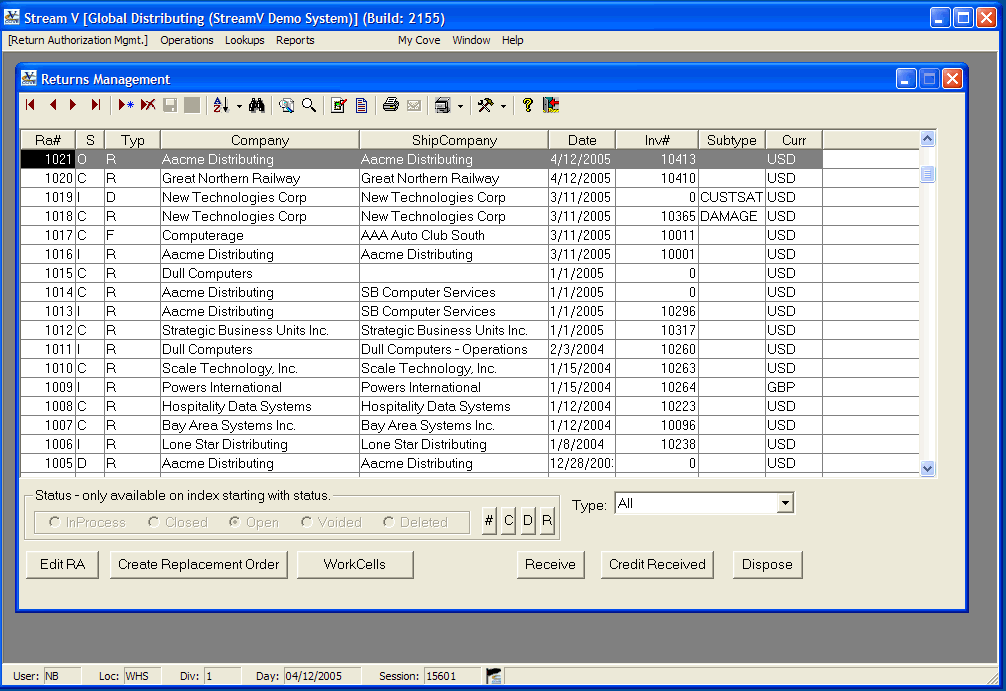
The Returns Management application requires you to select the items for each RA by invoice number. As you insert each new Return Authorization, the system displays the Invoice Lookup program. The Invoice Lookup program is a browse based program that allows you to locate a specific invoice using any of the several different search and display sequences available in the program.
The Invoice Lookup program also allows you to view detailed information about each invoice header and line item record in the system, including any serial numbers associated with the invoice.
Issues a unique return authorization number to a customer automatically
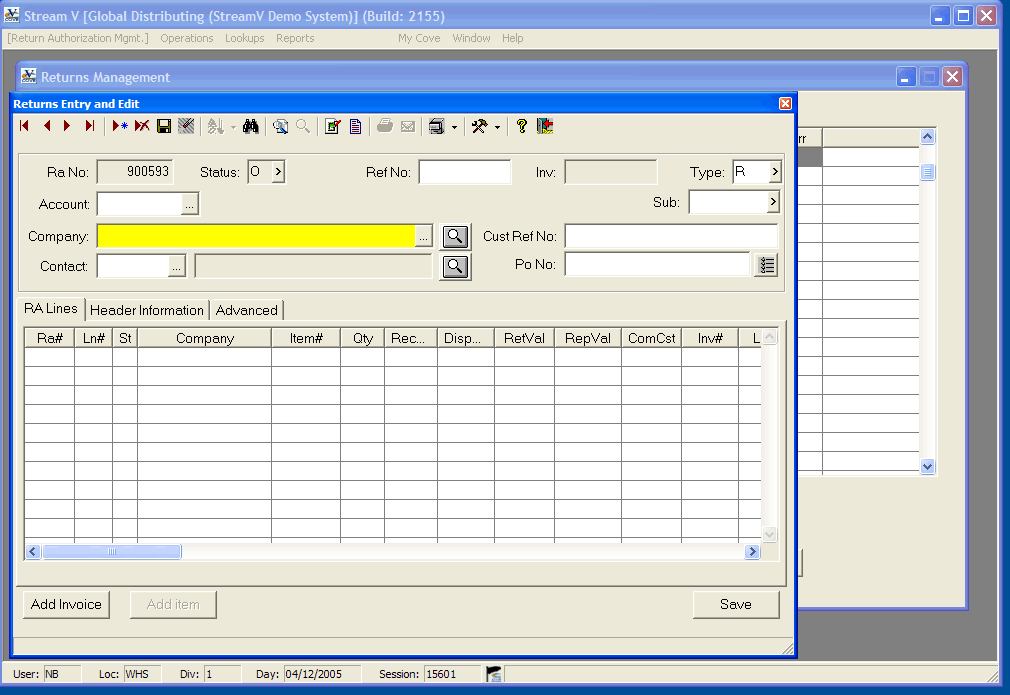
As you save each new Return Authorization record, the system assigns the return a unique RA Number. This RA number is used to track the customer return, and to identify the goods when they are later received at one of your warehouse locations. You should require all customer returns to be identified with a valid RA number, when you are using the RA system.
High-speed Cash Application
- Apply payments, pre-payments, and credit memos to invoices in an intuitive sophisticated but simple on-line environment.
- Transactions are automatically recorded in General Ledger.
- Apply cash to multiple cash or deposit accounts and Accounts Receivable accounts.
- Apply cash/credit to multiple companies.
Credit the customer for the items received against the return
Once the goods being returned by the customer have been physically received, and any cross shipment or replacement orders have been processed for the return, the RA is closed out by issuing the customer an accounts receivable credit memo. There are three different methods that can be used to issue the customer credit and close out the RA.
Dispose
This credits the customer for the returned items and closes out the RA Lines being disposed
Credit into Pending (Credit Received Button in Returns Management)
This option credits the customer for the returned items and closes out the RA Lines being disposed and it also moves the items being processed into the Pending File and reassigns the Pending items to a "House" customer. This option is typically used when the returned items are being inspected or repaired in house.
Credit & Create RTV Sales Order
This option credits the customer for the returned items and closes out the RA Lines being disposed. This option also prompts the operator for the Vendor for the items and it creates a Return to Vendor Order (a Loaner type sales order), that is used to ship the items back to the vendor for credit, repair or replacement.
Returns Management Features
-
Identify the items being returned
-
Issue a unique return authorization number
-
View the pricing and other details (shipto information, return and replacement prices, serial numbers) that are associated with the return authorization
-
Flag the items on the RA as received when they are physically received into your warehouse
-
Dispose
Identify the items being returned by the customer quickly and easily
The Returns Management application requires you to select the items for each RA by invoice number. As you insert each new Return Authorization, the system displays the Invoice Lookup program. The Invoice Lookup program is a browse based program that allows you to locate a specific invoice using any of the several different search and display sequences available in the program.
The Invoice Lookup program also allows you to view detailed information about each invoice header and line item record in the system, including any serial numbers associated with the invoice.
Issues a unique return authorization number to a customer automatically
As you save each new Return Authorization record, the system assigns the return a unique RA Number. This RA number is used to track the customer return, and to identify the goods when they are later received at one of your warehouse locations. You should require all customer returns to be identified with a valid RA number, when you are using the RA system.
High-speed Cash Application
- Apply payments, pre-payments, and credit memos to invoices in an intuitive sophisticated but simple on-line environment.
- Transactions are automatically recorded in General Ledger.
- Apply cash to multiple cash or deposit accounts and Accounts Receivable accounts.
- Apply cash/credit to multiple companies.
Credit the customer for the items received against the return
Once the goods being returned by the customer have been physically received, and any cross shipment or replacement orders have been processed for the return, the RA is closed out by issuing the customer an accounts receivable credit memo. There are three different methods that can be used to issue the customer credit and close out the RA.
Dispose
This credits the customer for the returned items and closes out the RA Lines being disposed
Credit into Pending (Credit Received Button in Returns Management)
This option credits the customer for the returned items and closes out the RA Lines being disposed and it also moves the items being processed into the Pending File and reassigns the Pending items to a “House” customer. This option is typically used when the returned items are being inspected or repaired in house.
Credit & Create RTV Sales Order
This option credits the customer for the returned items and closes out the RA Lines being disposed. This option also prompts the operator for the Vendor for the items and it creates a Return to Vendor Order (a Loaner type sales order), that is used to ship the items back to the vendor for credit, repair or replacement.